Showing posts with label Glitch. Show all posts

Friday, May 29, 2009

How to Hold a Turret Like a Chainsaw

Hey world, today I am going to be telling you how to hold a detached turret like a chainsaw.

First what you want to do is pick up a dual wieldable weapon (E.G. pistol, SMG, spiker etc.)

Now get on a turret, detach it, then drop it to the ground close to or on top of another duel wieldable weapon.

Ok now with your dual wieldable weapon out, press both Right Bumper and Left Bumper together, but press Left Bumper slightly before Right Bumper.

Make sure you are over the turret and it tells you what button to press to pick up the turret.

CONGRATS! You should be holding the machine gun turret like a chain saw!

P.S. You have to be host


Good Luck Gaming,
MattCarl

Tuesday, May 26, 2009

How to Super Jump on Last Resort

Today I'm going to show you how to perform a Super Jump on the map Last Resort (the one with the fan thing in the middle). For this little glitch/trick you will need two people.

So first off you want to go to this spot on Last Resort...
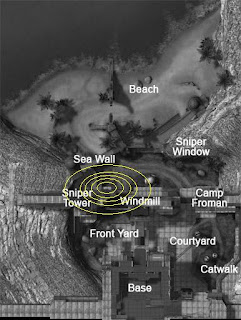
It is by the big fan in the middle and is on the side closest to the beach.

There is a tower that holds up a platform and there is a little gap in between the tower and the wall next to it.
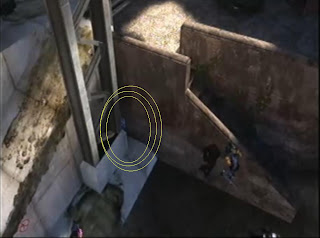
First you want to change your settings so when you press in the left analog stick once, you crouch and go back up and you do NOT stay crouched.

To do this you want to press start, Game Controls, then make sure it says next to crouch settings it DOES NOT say Toggle Crouch.

So what you are going to do is go right up in front of the little gap and tea bag really really fast, as fast as you can.

While you are doing this, someone should be behind you pushing you into the little gap. This may take a minute without practice

Now once you are in the gap it is going to look like this...
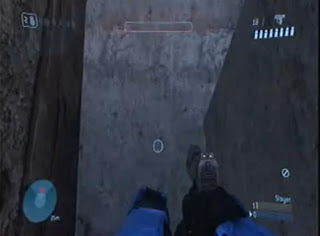
Ok, now walk forward and immediately JUMP! make sure you do precisely that or the glitch won't work. If you did it correctly you will be flying in the air.

I am pretty sure you CAN do this in matchmaking but there really is not any point.

Good Luck Gaming,
MattCarl

Monday, May 25, 2009

Forge Settings Trick

This isn't much of a trick but many people don't know that you can change the settings in Forge.

For example, you can change the settings so that only the Party Leader will be able to go into Forge (monitor) Mode. This is especially helpful if you want to work on your map while everyone else just screws around with what you make.

Just like in Custom Games, you can change the settings in Forge to what weapons you spawn with.

You can also change the forced color, respawn rate, amount of damage you take and a lot more settings you can fool around with.

To access this Settings Menu, you want to press the X button while you are in the Forge Lobby (Just like you would in a Custom Games Lobby).

Once you press X a menu will pop up and there are various different options you can fool around with.


Good Luck Gaming,
MattCarl