Showing posts with label Forge. Show all posts

Monday, June 1, 2009

How to Make a Blimp/Balloon

Hey guys and gals, today I am going to be explaining how to create a blimp or hot air balloon in Forge.

Now what you want to do is spawn a single open box and flip it over upside down so it should look like this...
Now spawn a Gravity Lift (scenery or equipment kind) and Deployable cover, make sure to spawn it inside the upside down box for easy access.

Now throw or put down the gravity lift

then after that, throw the Deployable cover.

YOU SHOULD BE FLYING LIKE... SUPERMAN!

The Deployable cover pushes the box up while you are inside, so as long as the Deployable cover is still floating, you are still flying.

The box may spin while you are in it, this is normal, it's k don't fret.


Good Luck Gaming,
MattCarl

Wednesday, May 27, 2009

How to Make a Clone

Have you ever wondered how people made super army's in forge? Well they clone themselves in game. To do this you are going to basically have something hit you, then break off a turret and you will just stand there (that's your cloned body).

So first things first, you want to go to the forge lobby and press X. This will bring up a settings menu. Go down to General Settings, from there choose Base Player Traits, then Shields and Health and finally change your Damage Resistance to 10%. This part is key for the whole glitch to work.

Now start the game and make a square out of shield doors, then you are going to place a soccer ball in the middle of the square and it will bounce back and forth from door to door really quickly. This is what it is going to look like...Now spawn a turret right next to it.

Ok so what you are going to do is walk into the ball that is going back and forth rapidly, you will notice pretty much all of your shields will go down.

Now quickly get on the turret and detach it.

You will die, but your body is still standing and it looks like it is holding an imaginary turret. CONGRATS!

The clones can not be saved to the map (so pretty much if you save the map and go back to it, the clones won't be there) but you can do this in Custom Games if everything is set up correctly.

They may disappear after a while

You can do this over Xbox Live but some people may not be able to see it


Good Luck Gaming,
MattCarl

Monday, May 25, 2009

Forge Settings Trick

This isn't much of a trick but many people don't know that you can change the settings in Forge.

For example, you can change the settings so that only the Party Leader will be able to go into Forge (monitor) Mode. This is especially helpful if you want to work on your map while everyone else just screws around with what you make.

Just like in Custom Games, you can change the settings in Forge to what weapons you spawn with.

You can also change the forced color, respawn rate, amount of damage you take and a lot more settings you can fool around with.

To access this Settings Menu, you want to press the X button while you are in the Forge Lobby (Just like you would in a Custom Games Lobby).

Once you press X a menu will pop up and there are various different options you can fool around with.


Good Luck Gaming,
MattCarl

Sunday, May 24, 2009

How to Make a Good Map in Forge

Ever wanted to make a map that everyone wanted to play? Well if so then keep reading, if not, then, um, your weird.

So, first think of an idea, make sure it is fun, maybe it's a remake of a game you played in Gym class or outside, maybe it's a remake of another map from an older Halo game or maybe it is just funny and clever. But make sure you have a good idea that sounds like people would be attracted to.

Practice around in forge, know the ins and outs of how to control things.

Start building your map, you can have a friend help you but make sure they know what you want and know how to forge correctly.

Make sure everything thing is lined up, most people judge a map on its looks, so make sure every wall is precisely lined up with the last, trust me, it makes all the difference.

If your game needs a specific game-type to go with it, make sure the settings are all correct.

Don't be afraid to test it out yourself and make sure everything is perfect before you want anyone else to see it.

Remember, think outside the box. Do something that hasn't been done before, or if it has, make it better and more fun, and make sure you are putting out quality work.

Good Luck Gaming,
MattCarl

How to Make "Wings" in Forge

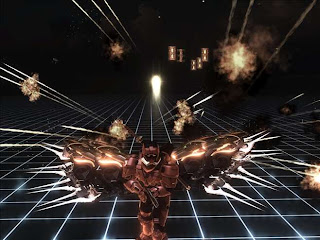
In this tutorial I will show you how to make yourself have "Wings" in Halo such as the picture below...
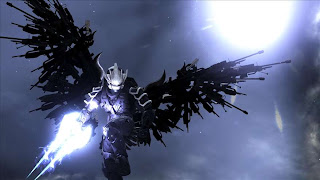

Ok now what you want to do is spawn a bridge and have it floating in the air on a 45 degree angle. Make sure that it isn't too flat (it will ruin the effect) or it isn't to steep (the weapons will fall off).

Now that you are holding it at a 45 degree angle, press start, save it as a new map, and load the map again. When you come back to that spot, the bridge will be floating in the position you were holding it.

It is now time to arrange the weapons however you want it. You can make yourself have wings, spikes, it's really up to your imagination.

Remember to leave a space for your body, always make it closer than you think because if you make the wings too far away from the body, it loses the effect.

Now that you have your wings the way you want them, SAVE CHANGES! This is crucial, now that you have saved the changes, delete the bridge that is holding the weapons. They should be floating in mid air.

If you want, you can lower you weapon (see other tutorial down below), personally, with a lowered weapon it makes the picture look more professional.

Now stand right in front of your creation, make sure you are centered with it and make a good pose.

Now go into Theater and take the screen shot!

If you want, you can add effects like Juicy, Gloomy, ect. or put our a power drain or regenerator to make it look cooler. It is really up to you.

Good Luck Gaming,
MattCarl
Thursday, May 21, 2009

How To Merge Objects Together in Forge

So you've been recently been playing Custom Games and you see two objects that are interlocked or merged together. Well I'm here to teach you how to do this awesome glitch in Forge.

Ok, so first you should take the object you want to merge (E.G a box, double box, wall etc.) and
change its settings so that it will spawn after a certain amount of time.

To do this, you need to be in monitor mode and have your cross hair over the object, now press the X button and the Item Properties Menu should appear.
Now you want to change "Place At Start" to say NO. Then go up one and change the Respawn Time to at least 30 seconds ( but you can do more if you feel more comfortable).

If you want you can place something like a street cone or a respawn node to help you remember where your object is going to appear.

Now start a new round and go to the place that your object is going to appear, spawn another object where you want them to merge together and wait for the first object to spawn.

By using this method you can create thing that look like this:
But you are only limited by your imagination so have fun with it.

Good Luck Gaming,
MattCarl


Wednesday, May 20, 2009

How to Equipment Jump

Hello World, and today I will be telling you how to equipment jump. Why on Earth would you want to equipment jump? Well some of the best hiding and sniping spots IN Halo involve using this technical technique (try saying that 5 times).

So first things first, the equipment you can jump off of are:
Radar Jammer, Flare, Deployable Cover, Power Drain, Trip Mine

It really helps if you are and Elite and Host, Now if your are in matchmaking then you aren't able to tell if you are host but you'll still be able equipment jump. But if you are in forge, look down, turn into monitor mode, then turn back into human, if you are still looking down then you are host.

All you have to do to equipment jump is look down, jump, throw the equipment, then jump again. So if you have the default setting you would quickly press A,X,A and WALAA!

The Flare and the Radar Jammer are a lot easier to jump off of if you are a human.

Jumping off of a Flare when you are an elite is next to impossible

Using a grenade jump and then a equipment jump can get you into almost any hiding spot.

Good Luck Gaming,
MattCarl

This is how high you can equipment jump